Every detail, one phone
Twelve things apps check, root and LSPosed included. All of them now say real phone.
Curious how apps spot an emulator in the first place? Read why apps can tell you are running an emulator
Phone name and model
Apps see a real phone brand and model, not an emulator.
Emulator settings and files
Settings and files that only an emulator has are gone, just like on a real phone.
Sensors
Sensors look like real phone parts, not the emulator's fake ones.
Battery
Battery size, health and charging look like a real phone.
Touchscreen and keys
The touchscreen and buttons carry real hardware names.
Phone radio
The modem shows a normal phone version instead of nothing.
Camera
Camera count and direction match a real phone.
Location
A believable last location instead of an empty one.
Graphics
The graphics chip shows a real phone GPU, not the emulator's.
Processor
Apps see a phone processor, not the PC chip the emulator runs on.
Root
Magisk and other root tools stay out of sight, so root checks pass.
Xposed and LSPosed
LSPosed and this module are hidden as well, so apps find nothing unusual.
Up and running in four steps
The four steps that matter on an emulator that already has root and LSPosed. Set it up once; after that, the apps you picked always see a real phone.
Install the app
Install the Hide My Emulator APK like any sideloaded app. Do not open it yet.
Turn it on in LSPosed
In LSPosed Manager, turn the module on and tick every app that should see a real phone.
Activate Premium, pick what to hide
Subscribe in the HME License app, then turn on the protection switches you want in the Status tab.
Restart the target app
Force-stop the app and open it again. It now sees a real phone.
What the app sees afterwards
After the restart, a detector app inside the emulator reports Emulator: False and LSPosed: False. The install guide ends on the same check, so you know the setup worked before you open the app you care about.
See step 6 of the install guide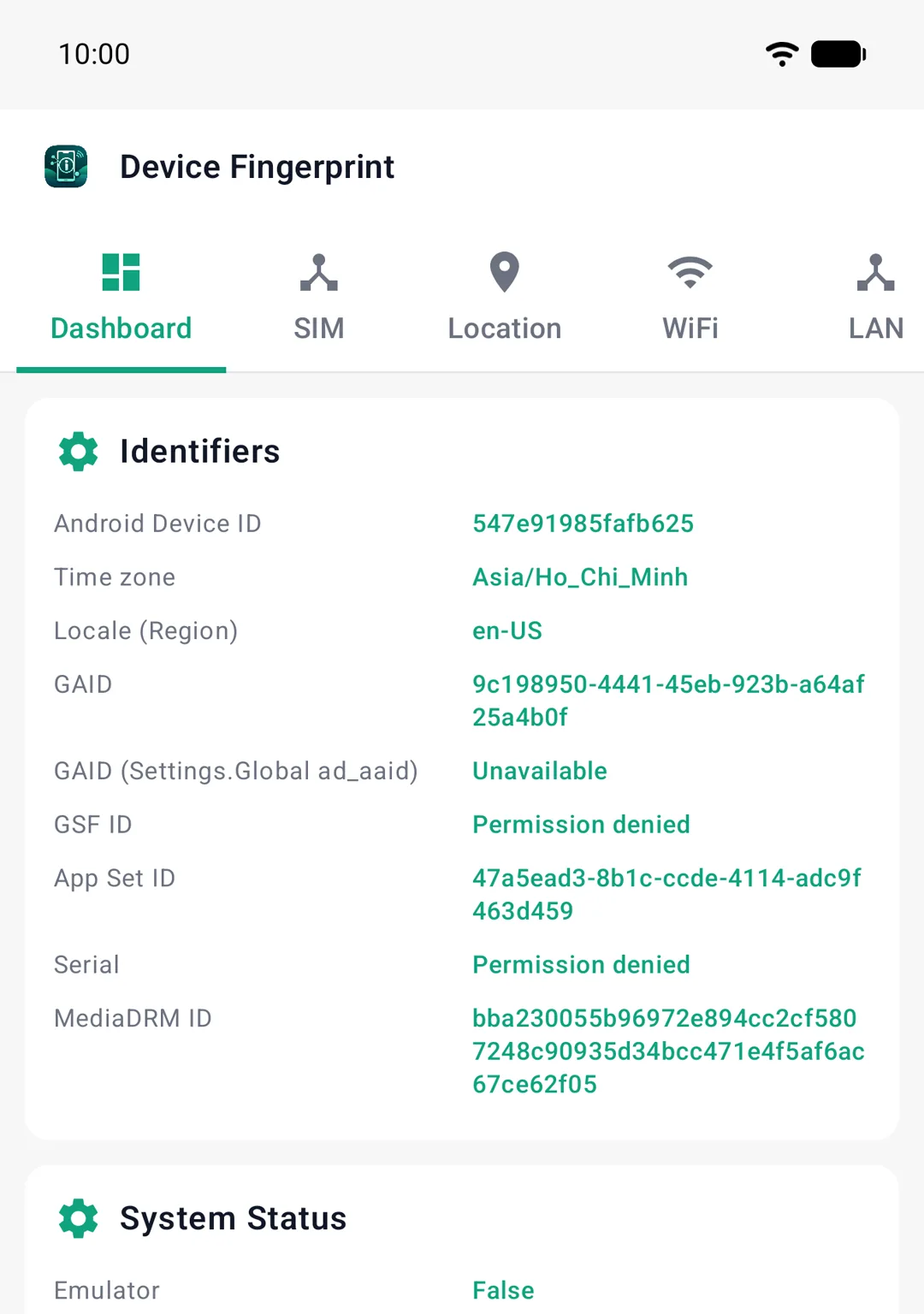
Requirements
Rooted emulator
Magisk
LSPosed framework
Any current LSPosed build
Android 9.0+
API level 28 or newer
One plan, everything included
One monthly plan unlocks everything. Nothing to compare.
Billed monthly through Google Play · Cancel anytime
- Everything hidden, all twelve parts
- Looks like a real phone
- Pick which apps, one-tap switches
- Updates while subscribed
- Email and Telegram support
Premium is managed by the HME License app: install it from Google Play, subscribe, and Hide My Emulator picks up your Premium status automatically.
Need the module first? Download APK
Frequently asked questions
Straight answers before you install anything.
What do I need to run Hide My Emulator?
Which emulators are supported?
Will every app stop detecting my emulator?
Does it hide root and LSPosed too?
Does it touch my apps' data or accounts?
How does Premium work?
How is this different from Hide My Android?
How do I cancel or get a refund?
Still have questions?
Email supportReady to make your emulator invisible?
Install once, pick your apps, and every launch looks like a real phone.